
RESOURCE

AWS Loading Screen · Open Source

$10.79 −40% $17.99

Open-Source · See package requirements

DISCOVER THE RESOURCE

See what you can do.

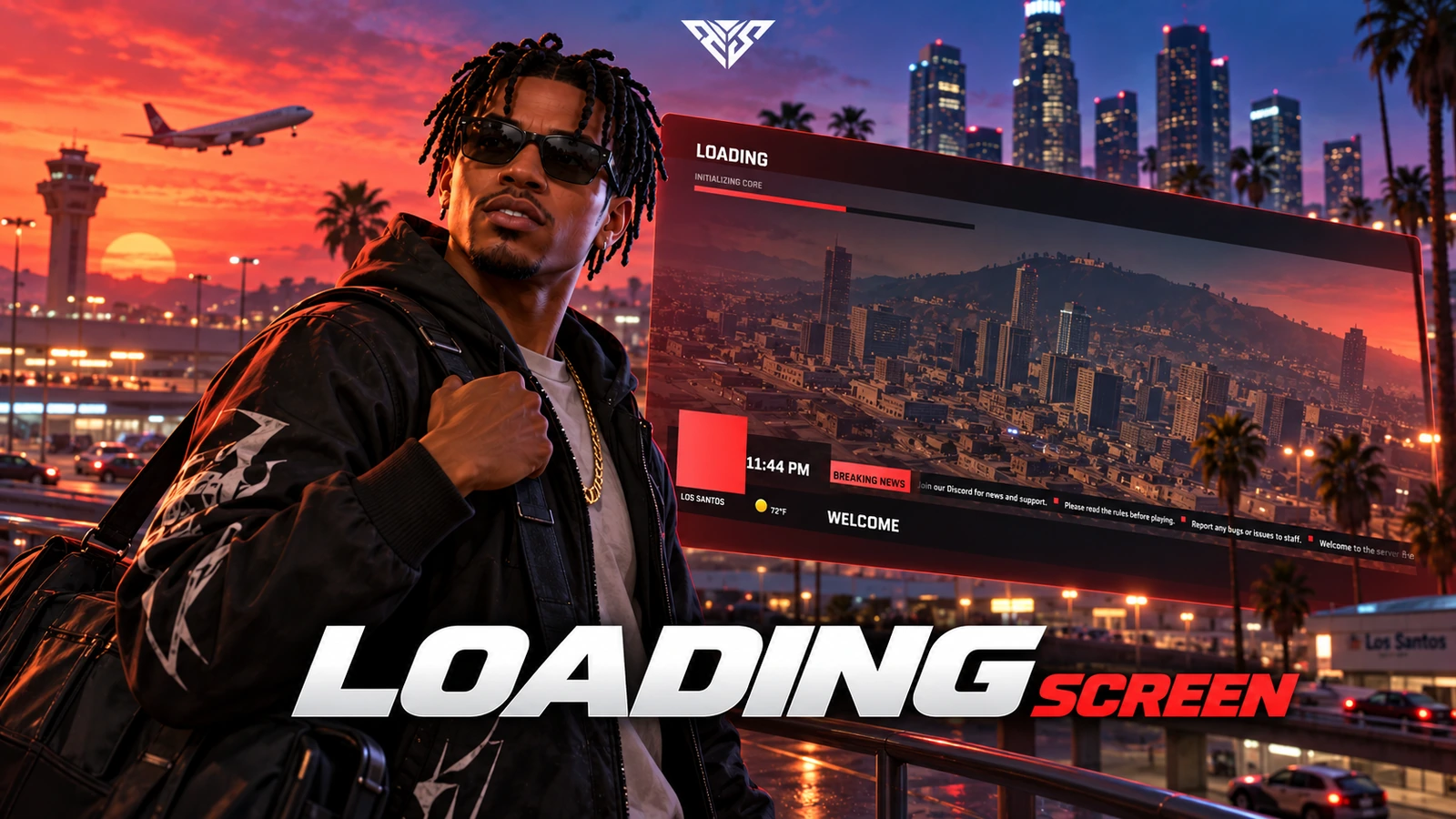
A configurable connection/loading screen with background video, server branding, ticker messages and framework-aware shutdown.

Original resource interface · Example data
01 / FEATURE

Modern & Premium UI Design

  • Broadcast-Style Interface: A sleek, news-channel-inspired layout with slanted panels, gradient accents, and dark glass-style panels for a high-end first impression.

  • Fluid Animations: Smooth transitions and subtle micro-animations that make the loading screen feel alive and polished.

  • Responsive Layout: Em-based and clamp() scaling ensures a consistent look across all resolutions.

Feature highlights
  1. 01

    Full-Screen Video Background

  2. 02

    Volume Control

  3. 03

    Custom Logo

  4. 04

    Smooth Fade-Out

AWS Loading Screen
02 / FEATURE

Custom Background Video & Branding

  • Full-Screen Video Background: Drop your own .mp4 or .webm into ui/assets/ and set the filename in config.lua.

  • Volume Control: Background video volume is fully adjustable from 0.0 (muted) to 1.0 (full volume).

  • Custom Logo: PNG or SVG logo support — display your server branding right on the loading screen.

  • Smooth Fade-Out: The screen fades out cleanly when the player finishes loading.

Feature highlights
  1. 01

    Native FiveM Integration

  2. 02

    Stage Labels

  3. 03

    Styled Progress Bar

AWS Loading Screen
03 / FEATURE

Real-Time Loading Progress

  • Native FiveM Integration: Live loading progress and stage info pulled directly from the game engine.

  • Stage Labels: Displays real-time stages such as "Initializing core", "3d preprocessing", "3d models", and "Session".

  • Styled Progress Bar: A slanted, gradient-filled progress bar keeps players informed at every step.

Feature highlights
  1. 01

    Breaking Headline

  2. 02

    Scrolling Ticker

  3. 03

    Live Temperature Widget

  4. 04

    Weather-Aware

AWS Loading Screen
04 / FEATURE

Dynamic News Ticker & Info Panel

  • Breaking Headline: Fully customizable headline via Config.Headline.

  • Scrolling Ticker: Rotate server announcements, Discord invites, rules, and more through Config.TickerItems.

  • Live Temperature Widget: Auto temperature based on in-game weather, or set a manual value — toggle between °F and °C.

  • Weather-Aware: Automatically adjusts temperature for EXTRASUNNY, RAIN, SNOW, BLIZZARD, and all other GTA weather types.

Feature highlights
  1. 01

    Framework and dependencies

  2. 02

    Framework and dependencies

  3. 03

    Smart Shutdown

  4. 04

    Framework and dependencies

AWS Loading Screen
05 / FEATURE

Multi-Framework Compatibility

  • Framework and dependencies: FiveM Optional QBCore, Qbox or ESX for framework-aware load completion
  • Smart Shutdown: Closes automatically on esx:playerLoaded and QBCore:Client:OnPlayerLoaded events.

Feature highlights
  1. 01

    Default Theme

  2. 02

    Halloween Theme

  3. 03

    Christmas Theme

AWS Loading Screen
06 / FEATURE

Seasonal Themes

  • Default Theme: Red gradient with dark panels — perfect for everyday use.

  • Halloween Theme: Orange tones and seasonal accents.

  • Christmas Theme: Festive red styling — switch instantly with Config.Theme.

Feature highlights
  1. 01

    4 Built-in Locales

  2. 02

    JSON-Based Translations

  3. 03

    Easy Locale Switch

AWS Loading Screen
07 / FEATURE

Multi-Language Support

  • 4 Built-in Locales: English, Brazilian Portuguese, Spanish, and Swedish included out of the box.

  • JSON-Based Translations: Edit locales/*.json to change any text without touching the core code.

  • Easy Locale Switch: Set Config.Locale = "en" in one line.

Player workflow
  1. 01

    Connect to the server

  2. 02

    View server branding and media

  3. 03

    Return to gameplay when loading ends

AWS Loading Screen
08 / HOW IT WORKS

From first interaction to gameplay

A configurable connection/loading screen with background video, server branding, ticker messages and framework-aware shutdown.

  • Reconnect through the normal server connection flow to test the actual loadscreen lifecycle.
  • Check the logo, video audio, progress and eventual return to gameplay.
Before you install
  1. 01

    FiveM

  2. 02

    Optional QBCore, Qbox or ESX for framework-aware load completion

AWS Loading Screen
09 / FEATURE

Make it fit your server

Use the included source and configuration to connect this resource to your existing server. The installation guide lists the required adapters, items and startup order.

Configuration and integration details
  • config.lua: Config.Headline, TickerItems, Theme and Locale control the visible content.
  • Config.BackgroundVideo, BackgroundVideoVolume and Logo select the media.
  • Config.Framework and FallbackTimeout control shutdown.
  • shared/locale.lua and the included locale files provide translation handling.

Read installation and configuration →

WATCH THE RESOURCE

See the full showcase.

The original product video, directly on this page.

THE PACKAGE

What is included

  • Readable resource source and configuration
  • Installation README and package instructions
  • Original web interface and supplied UI assets

Third-party frameworks, inventory systems and optional paid maps are separate.

GETTING STARTED

Installation essentials

aws-loadingscreen

Package-specific setup notes
  • Disable competing loading-screen resources to avoid overlapping screens.
  • Place your configured video and logo in ui/assets/ and keep filenames identical to Config.BackgroundVideo and Config.Logo.
  • Select the framework or use auto. Review Config.FallbackTimeout so the loading screen can close if the expected framework event is unavailable.
Open the installation guide ↗
Expanded product interface

Updates & release notes

v2026.10.16 2026-10-16

Reviewed open-source delivery package.


THE AWS COMMUNITY

Recent Payments

Recent purchases and free claims.

✓ Completed orders
Johngotty123FREE
✓ Free claim
ZKM93FREE
✓ Free claim

JOIN OUR DISCORD

Need help with this package? Join our community for installation help, support and updates.

JOIN SERVER

VIEW DOCUMENTATION

Detailed installation guides, configuration examples, and technical requirements for this resource.

READ GUIDES