
RESOURCE

AWS CarSound V1 · Open Source

$45.00 −40% $75.00

Open-Source · See package requirements

DISCOVER THE RESOURCE

See what you can do.

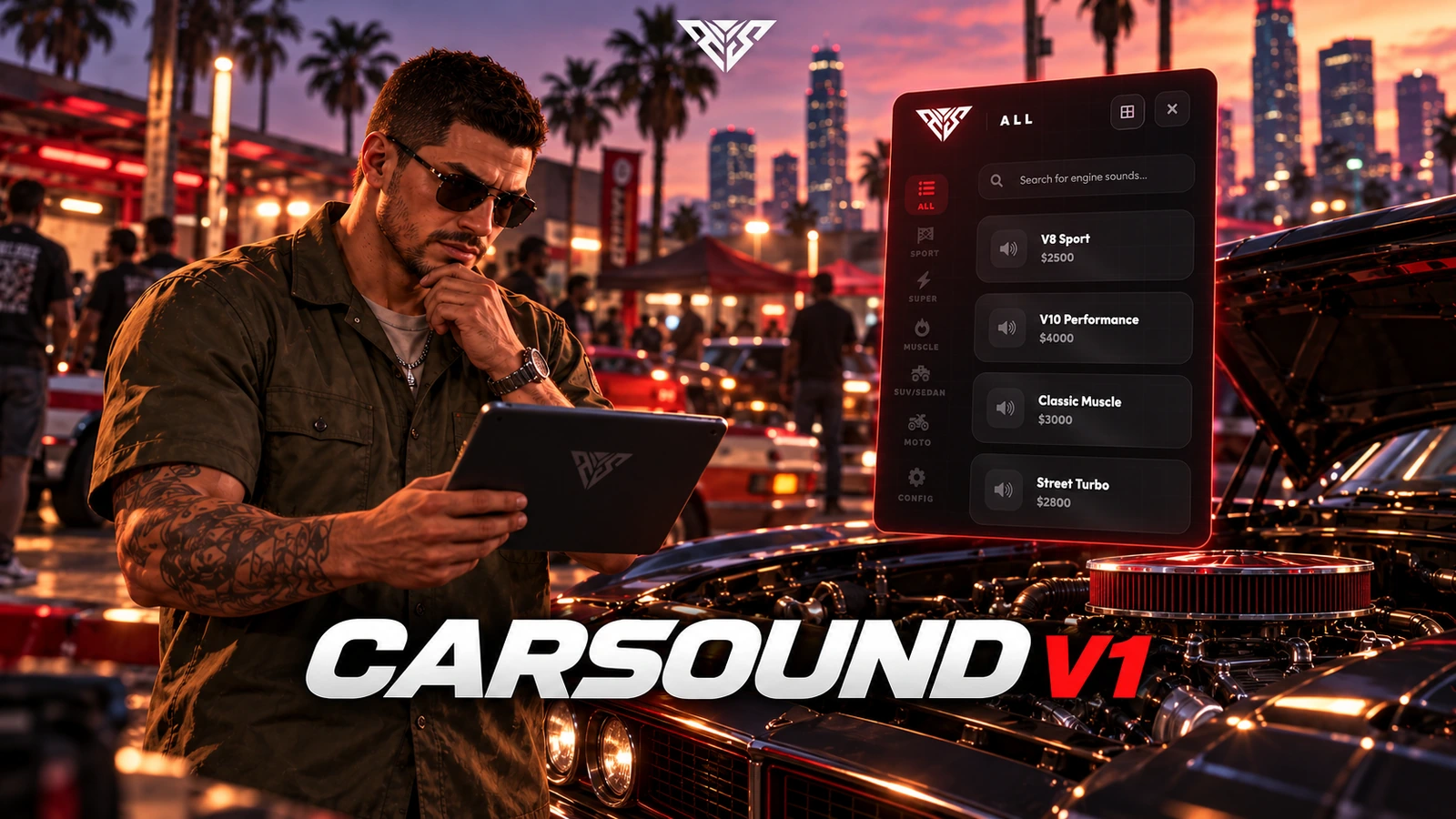
CarSound V1: 95+ engine sounds with workshop previews and plate-based saved installations.

Original feature showcase · Video preview
01 / FEATURE

Premium Glassmorphism User Interface

Modern Aesthetic: A stunning tablet-style interface featuring the latest "Glassmorphism" design trends with real-time blur effects and elegant transparency.

Fluid Performance: interaction with high response speed makes browsing through the configured engine sounds smooth and satisfying.

Dynamic Categorization: Sounds are organized into 5 intuitive categories: Sport/JDM, Supercar, Muscle Car, SUV/Luxury, and Motorcycles.

Original feature showcase · Video preview
02 / FEATURE

95+ engine sounds · CarSound V1

  • Sound library: 95+ selectable engine sounds for your vehicle workshop.
  • Categories: Sport/JDM, Supercar, Muscle, SUV/Luxury and Motorcycles.
  • Preview before installing: Listen on the active vehicle before purchasing the configured sound installation.
  • Editable selection: Configure sound entries, labels and in-game prices in the supplied source.
EDITION COMPARISON
  1. 01

    V1 · 95+ sounds · 5 categories

  2. 02

    V2 · 151+ sounds · 6 categories

AWS CarSound V1
03 / FEATURE

CarSound V1 or V2: choose your edition

  • V1 — 95+ sounds: Five sound categories, workshop previews and installations saved by vehicle plate.
  • V2 — 151+ sounds: Six categories including Police, favourites, price sorting, installed badges, rev preview and reset-to-stock options, plus dedicated sound storage.

Install one edition per server. V1 and V2 share commands and integration identifiers.

V1 installation guide · V2 installation guide

Original feature showcase · Video preview
04 / FEATURE

Advanced Persistence & Framework Support

Database Integration: Purchased engine sounds are saved directly to the vehicle's plate in your database. The sound persists even after server restarts or vehicle respawns.

Framework and dependencies: oxmysql QBCore or ESX. A Qbox branch is included, but its exports and staff permission checks must be checked against your core before live use.

Auto Synchronization: Engine sounds are synchronized across all nearby players through optimized server-side logic.

Original feature showcase · Video preview
05 / FEATURE

Full Customization & Management Tools

Developer Friendly: A highly detailed config.lua allows you to change prices, locations, markers, blips, and job requirements in seconds.

Admin Commands: Use the built-in /carsound command to open the menu from anywhere (permission required) for quick tests or events.

Discord Logging: Track every purchase with detailed Discord Webhook integration, including player info, vehicle plate, and amount paid.

Original feature showcase · Video preview
06 / FEATURE

High Performance & Optimization

Smart Loading: Assets load only when needed, preventing unnecessary memory usage for your players.

[TECHNICAL DETAILS]

Source access: The prepared delivery package includes readable resource files and editable configuration.

Framework and dependencies: oxmysql QBCore or ESX. A Qbox branch is included, but its exports and staff permission checks must be checked against your core before live use.

Player workflow
  1. 01

    Enter a workshop

  2. 02

    Preview an engine sound

  3. 03

    Install and save by plate

AWS CarSound V1
07 / HOW IT WORKS

From first interaction to gameplay

A workshop interface for previewing, purchasing and saving vehicle engine sounds by plate.

  • Enter a configured workshop in a vehicle and use the interaction prompt.
  • Authorized staff can open /carsound when Config.Admin.AllowCommand is enabled.
Before you install
  1. 01

    oxmysql

  2. 02

    QBCore or ESX. A Qbox branch is included, but its exports and staff permission checks must be checked against your core before live use.

AWS CarSound V1
08 / FEATURE

Make it fit your server

Use the included source and configuration to connect this resource to your existing server. The installation guide lists the required adapters, items and startup order.

Configuration and integration details
  • config.lua: Config.HeaderTitle, Config.Currency and Config.MoneyType control presentation and payment account.
  • Config.Locations sets workshop coordinates, mechanic job and requireJob rules. Config.RequireJob enables the general job check.
  • Config.Sounds defines the engine sound entries and prices. Config.Admin controls the carsound command and staff groups.
  • Config.Interaction selects classic, modern or ox_lib prompts. Start ox_lib before this resource if you select that integration.

Read installation and configuration →

WATCH THE RESOURCE

See the full showcase.

The original product video, directly on this page.

THE PACKAGE

What is included

  • Readable resource source and configuration
  • Installation README and package instructions
  • Original web interface and supplied UI assets

Third-party frameworks, inventory systems and optional paid maps are separate.

GETTING STARTED

Installation essentials

oxmysql / qb-core / aws-carsounds

Package-specific setup notes
  • Use V1 or V2 on a server, rather than starting both. They share sound commands and integration identifiers.
  • Back up player_vehicles (QB) or owned_vehicles (ESX). The server attempts to add the engine_sound column automatically; the database user needs ALTER permission. No separate SQL installer is included.
Open the installation guide ↗
Expanded product interface

Updates & release notes

v2026.10.16 2026-10-16

Reviewed open-source delivery package.


THE AWS COMMUNITY

Recent Payments

Recent purchases and free claims.

✓ Completed orders
Johngotty123FREE
✓ Free claim
ZKM93FREE
✓ Free claim

JOIN OUR DISCORD

Need help with this package? Join our community for installation help, support and updates.

JOIN SERVER

VIEW DOCUMENTATION

Detailed installation guides, configuration examples, and technical requirements for this resource.

READ GUIDES