
RESOURCE

AWS SmartTab · Open Source

$42.00 −40% $70.00

Open-Source · See package requirements

DISCOVER THE RESOURCE

See what you can do.

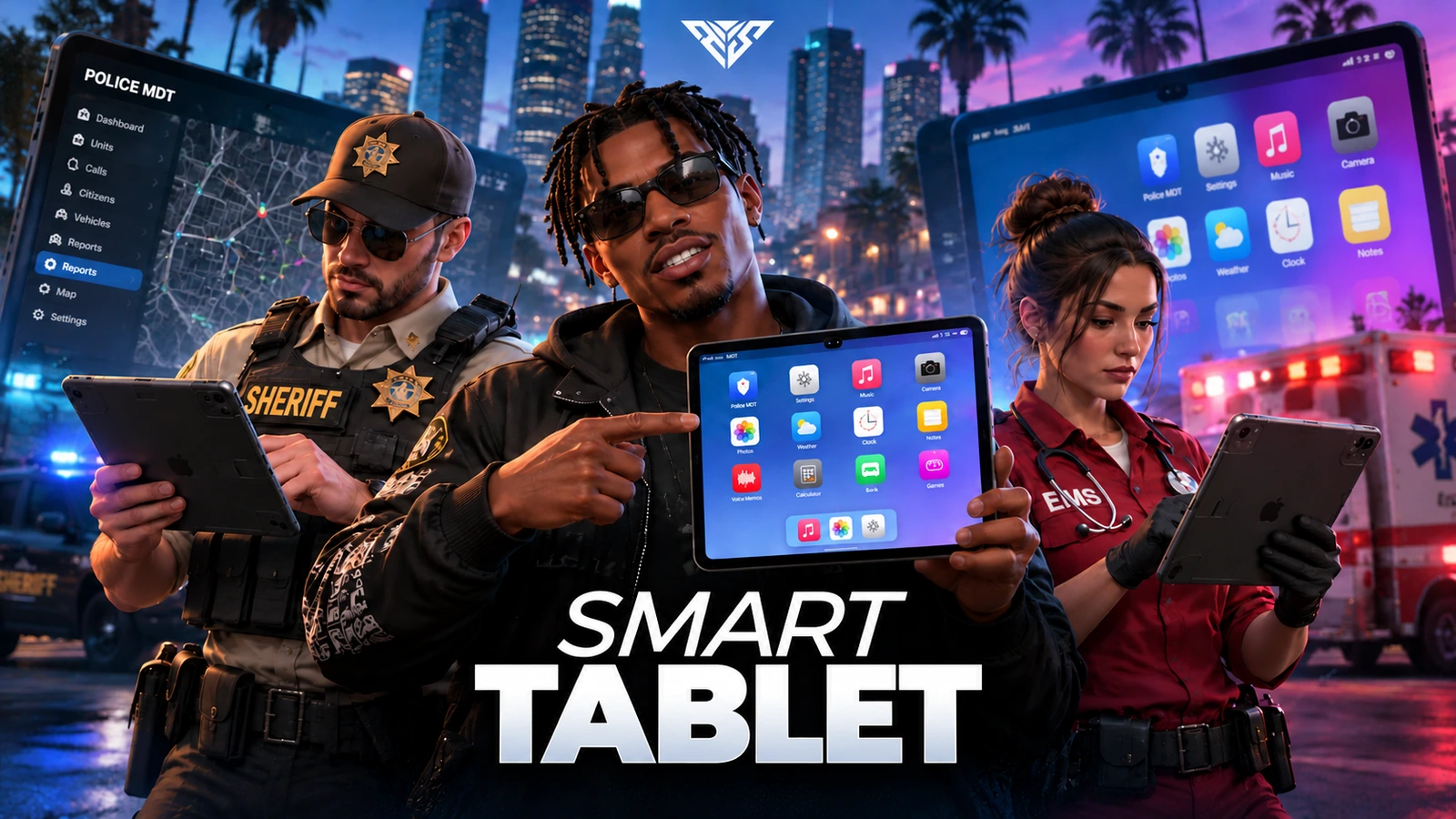
An in-game tablet containing apps, games, music, camera tools, MDT and dispatch integrations.

Original resource interface · Example data
01 / FEATURE

Premium  Tablet Experience

Glassmorphism & Modern UI
A true tablet feel with-style squircle icons, lock screen, Control Center, status bar (signal, Wi‑Fi, battery), and smooth transitions. Your own ecosystem — no external phone script required.

Inventory Item
Use the aws_game_tablet item with prop + animated tablet usage. ox_inventory and qb-core install files included.

Peek-Through Mode
When the cursor leaves the tablet frame, the screen becomes semi-transparent so you can see the game while using the tablet. Walk while the tablet is open (WASD).

10+ Languages
Turkish, English, German, French, Spanish, Italian, Portuguese, Dutch, Russian, Chinese, Hindi, Hawaiian, and more.

Feature highlights
  1. 01

    Settings & Personalization

AWS SmartTab
02 / FEATURE

Settings & Personalization

Full Customization Hub
Theme (light/dark), wallpaper, tablet frame, brightness, notifications, airplane mode, streamer mode, language selection.

Profile & Battery Simulation
Player info, simulated battery state, and personal tablet preferences in one place.

Cosmetic Catalog
Premium themes and frames — managed from Settings, fully toggleable via config.

Feature highlights
  1. 01

    Camera & Gallery

AWS SmartTab
03 / FEATURE

Camera & Gallery

Live Game Viewfinder
WebGL game view for a real in-world preview — photo, portrait, and video modes.

Walkable Scripted Camera
Selfie mode, zoom, look controls, in-vehicle camera, and freeze mode support.

Gallery & Cloud Backup
Media saved in the gallery. Fivemanage (v2/v3) upload for photos/videos to the cloud. Local IndexedDB fallback mode.

Media Integration
Attach photos to profiles, MDT records, and vehicle records.

Feature highlights
  1. 01

    Music, Boombox & Car Radio

AWS SmartTab
04 / FEATURE

Music, Boombox & Car Radio

Tablet Music App
Search, queue, playlists, shared playlist codes, listening history, and learned track database.

xsound 3D Audio
Tablet speaker output, ambient audio for nearby players, vehicle acoustics simulation.

In-Game Music HUD
“Now playing” widget on the left when the tablet is closed — control with the G key.

Boombox & Car Radio Items
Placeable speakers (modern/retro), per-vehicle sound system setup — target support included.

Feature highlights
  1. 01

    Bank & Economy

AWS SmartTab
05 / FEATURE

Bank & Economy

Tablet Bank App
Player-to-player transfers via Server ID, phone number, citizen ID, or nearby player.

Flexible Payments
Cash/bank source, fee percentage, limits, and cooldown — all config-driven.

Transaction History
Chart and list views for recent transfers.

Feature highlights
  1. 01

    Police MDT & EMS Terminal

AWS SmartTab
06 / FEATURE

Police MDT & EMS Terminal

Police MDT
Profile search, vehicle records, reports, cases, warrants, jail records, unit roster, dispatch history.

EMS MDT
Live dispatch, patient records, staff management, dispatch response.

Penal Codes
Categorized offence catalog, multi-offence selection on profiles, discounted fines/jail/community service application.

Management Panel (Boss)
Hiring, rank assignment, unit staff management — isboss grade support.

Offence Catalog Editor
Boss permission to add, edit, and delete categories/offences in-game (CRUD).

Framework and dependencies: ox_lib, oxmysql, xsound and screenshot-basic A supported framework/inventory path: QBCore, Qbox or ESX; ox_inventory has an included item adapter

Feature highlights
  1. 01

    Dispatch System

AWS SmartTab
07 / FEATURE

Dispatch System

Live Dispatch HUD
Notification cards on the left/right when the tablet is closed — priority colors, sounds, and map blips.

Dispatch Menu
Full list with the O key — respond, set waypoint.

Ready-Made Alert Exports
Shooting, Officer Down, EMS Down, robberies, vehicle theft, explosions, and more — trigger with a single export line.

Officer Codes
kod0, kod1, kod99, kod100, etc. — /kod99 command and export support.

10-Code System
Realistic dispatch codes, fully customizable in config.

Database Persistence
Dispatch records persist — viewable in MDT history.

Feature highlights
  1. 01

    Arcade & Mini Games

AWS SmartTab
08 / FEATURE

Arcade & Mini Games

Casino / Arcade App
Slot machine (animated reels), coinflip, dice, plinko, mines — bank balance based.

Classic Web Games
Snake, Pong, Breakout, Soccer Mini — iframe mini-games.

Server Authority
All bets and payouts validated server-side.

Feature highlights
  1. 01

    Party Games (Lobby)

AWS SmartTab
09 / FEATURE

Party Games (Lobby)

Multiplayer Lobby System
6-digit room code, 1–12 players, room management.

Active Games
• Vampire & Villager
• Mafia
• Spyfall

Solo Test Mode
Minimum 1 player for development/testing.

Feature highlights
  1. 01

    Other Built-In Apps

AWS SmartTab
10 / FEATURE

Other Built-In Apps

Notes — quick text records
Voice Memos — microphone recording
Calculator — full-featured
Clock — world clock, alarm, stopwatch, timer
Weather — live weather widget
About — system info
Profile — character overview and stats

Feature highlights
  1. 01

    Developer & Integration

AWS SmartTab
11 / FEATURE

Developer & Integration

Rich Export Set
Open/close tablet, add/remove dispatch, trigger alerts, MDT logging, walkable cam API, and more.

Dependencies
ox_lib · oxmysql · xsound · screenshot-basic

Framework and dependencies: ox_lib, oxmysql, xsound and screenshot-basic A supported framework/inventory path: QBCore, Qbox or ESX; ox_inventory has an included item adapter

Source access: The prepared delivery package includes readable resource files and editable configuration.

Feature highlights
  1. 01

    Installation & Support

AWS SmartTab
12 / FEATURE

Installation & Support

install/ Folder
Setup guide, ox_inventory module, qb-core items, ESX SQL, transparent PNG item images.

Automatic Database
MDT, bank, gallery, music, and dispatch tables created automatically.

Documentation
Inline config comments for Fivemanage, MDT management, dispatch, and music settings.

Player workflow
  1. 01

    Use the tablet item

  2. 02

    Choose an enabled app

  3. 03

    Access its configured tools

AWS SmartTab
13 / HOW IT WORKS

From first interaction to gameplay

An in-game tablet containing apps, games, music, camera tools, MDT and dispatch integrations.

  • Use aws_game_tablet from inventory. A client can also call exports['aws-tablet']:OpenTablet().
  • Test music, camera saving and MDT permissions separately; validate them using an ordinary player and a permitted job account.
  • Read install/KURULUM.md for item export bindings. Keep existing DB data when upgrading.
Before you install
  1. 01

    ox_lib, oxmysql, xsound and screenshot-basic

  2. 02

    A supported framework/inventory path: QBCore, Qbox or ESX; ox_inventory has an included item adapter

AWS SmartTab
14 / FEATURE

Make it fit your server

Use the included source and configuration to connect this resource to your existing server. The installation guide lists the required adapters, items and startup order.

Configuration and integration details
  • config.lua: Config.ItemName is aws_game_tablet by default.
  • Config.Music, Camera, Upload, Gallery and Integrations select app behavior and external integrations.
  • Config.MDT and config/dispatch.lua control jobs, MDT and dispatch settings.
  • config/dispatch-alerts.lua defines alert configuration. Do not enable apps that lack their required backend on your server.

Read installation and configuration →

WATCH THE RESOURCE

See the full showcase.

The original product video, directly on this page.

THE PACKAGE

What is included

  • Readable resource source and configuration
  • Installation README and package instructions
  • Original web interface and supplied UI assets

Third-party frameworks, inventory systems and optional paid maps are separate.

GETTING STARTED

Installation essentials

ox_lib / oxmysql / qb-core / ox_inventory / xsound / screenshot-basic / aws-tablet

Package-specific setup notes
  • Back up the database and review/import aws_tablet_schema.sql. Several modules also initialize their tables with CREATE TABLE IF NOT EXISTS.
  • Follow install/KURULUM.md and use only your inventory path: install/ox_inventory, install/qb-core or install/esx. Merge item definitions instead of replacing the inventory item table.
  • Copy install/items/*.png to the inventory image directory. Item names include aws_game_tablet, boombox, boombox_retro and car_radio.
  • Start the selected framework/inventory before this resource. Configure camera/upload services in config/upload.lua with your own permitted service settings.
Open the installation guide ↗
Expanded product interface

Updates & release notes

v2026.10.16 2026-10-16

Reviewed open-source delivery package.


THE AWS COMMUNITY

Recent Payments

Recent purchases and free claims.

✓ Completed orders
Johngotty123FREE
✓ Free claim
ZKM93FREE
✓ Free claim

JOIN OUR DISCORD

Need help with this package? Join our community for installation help, support and updates.

JOIN SERVER

VIEW DOCUMENTATION

Detailed installation guides, configuration examples, and technical requirements for this resource.

READ GUIDES