
RESOURCE

AWS Lumberjack · Open Source

$17.99 −40% $29.99

Open-Source · See package requirements

DISCOVER THE RESOURCE

See what you can do.

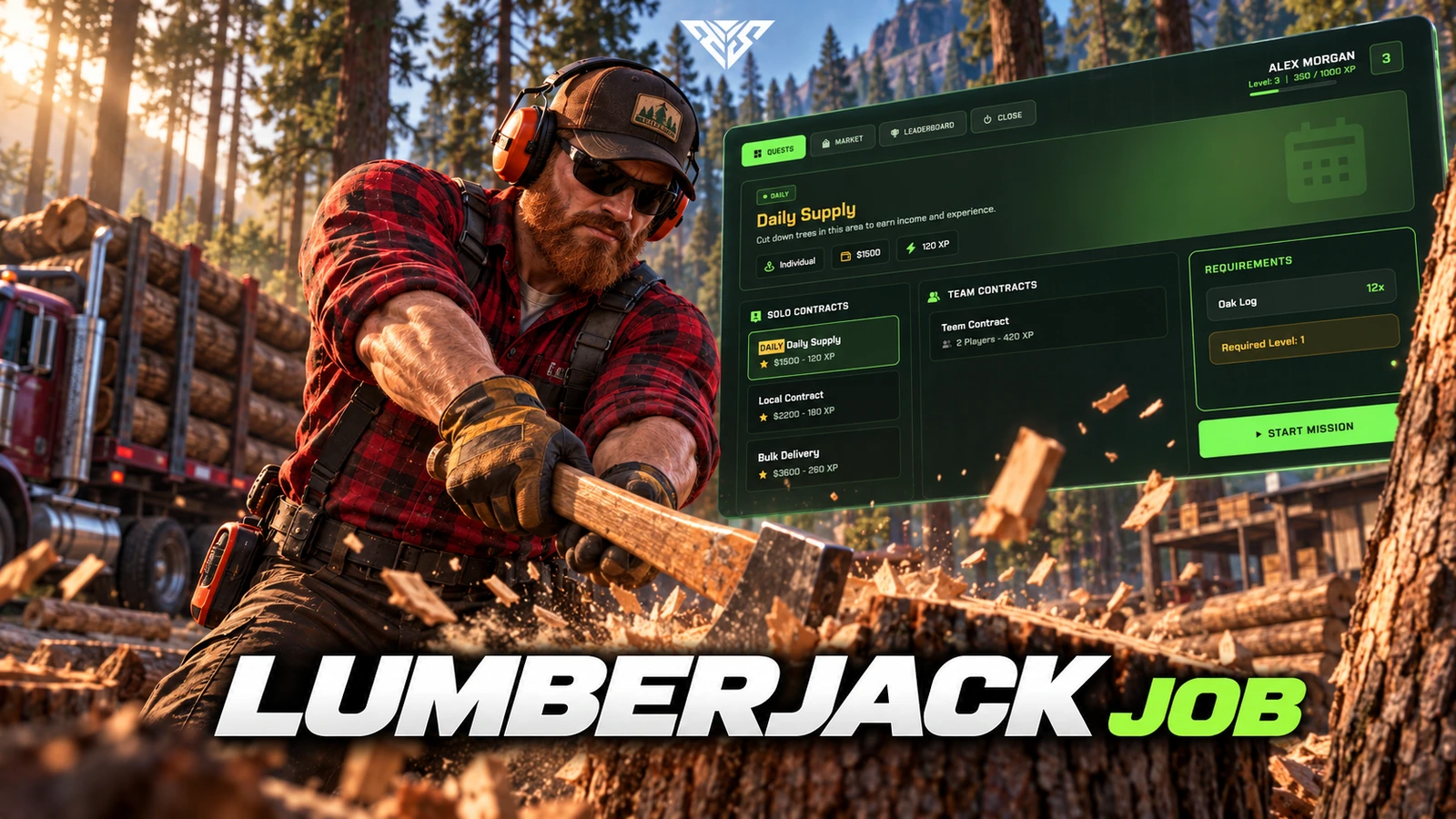
Forestry job with trees, axe handling, progression, missions and a tablet hub.

Original resource interface · Example data
01 / FEATURE

Forest Operations Tablet UI

• Modern NUI Panel: Full-screen lumber operations center with profile card, live XP bar, and tabbed navigation (Quests, Market, Leaderboard).

• Dynamic Hero Themes: Panel header adapts per section — forest green for quests, market previews for sales, trophy styling for rankings.

• Immersive Audio Feedback: Built-in UI sounds for axe hits, pickups, level-ups, quest completion, errors, and warnings — no external sound pack required.

• Locale-Ready Interface: English & Turkish locale files included; all panel strings configurable via JSON.

Feature highlights
  1. 01

    Advanced Tree Chopping System

AWS Lumberjack
02 / FEATURE

Advanced Tree Chopping System

• Three Tier Tree Zones: Pine (Level 1+), Oak (Level 3+), and Birch/Maple (Level 10+) — each with unique health, XP rewards, and material drop tables.

• Custom Dynasty Props: Dedicated stream pack with custom pine, oak, and birch tree models plus animated wood drop props — no vanilla tree clipping.

• Realistic Chop Loop: Hand-attached axe prop, swing animations, distance-based hit/miss/fall audio, and synchronized tree health depletion.

• Smart Drop Protection: Ground loot spawns with a configurable protection timer so other players cannot instantly steal your materials.

• Auto Tree Respawn: Felled trees respawn after a configurable delay (default 15s) across dozens of fixed spawn coordinates per zone.

Feature highlights
  1. 01

    Axe Progression & Durability

AWS Lumberjack
03 / FEATURE

Axe Progression & Durability

• Three Axe Tiers: Rusty, Iron-Head, and Mythical axes — each with unique damage, durability, price, level requirement, and bonus drop chance.

• ox_inventory Durability: Full durability support per hit; axe breaks at zero with audio + notification feedback.

• Visual Axe Props: Level 1–3 custom axe models plus optional physical axe crate at the depot.

Feature highlights
  1. 01

    Quest & Group Expedition Engine

AWS Lumberjack
04 / FEATURE

Quest & Group Expedition Engine

• Solo Mission Chain: Daily quest, starter rewards, and multi-stage progression (Novice → Apprentice → Journeyman → Master → Grand Master).

• Group Expeditions: Party-based missions with recommended player counts — invite nearby players and share progress.

• Live Quest HUD: Real-time material tracking in-panel; return to depot to claim cash + XP rewards.

• Quest Abandon & Recovery: Cancel active missions anytime; /fixlumberjack command to reset stuck states.

Feature highlights
  1. 01

    Economy, Market & Leveling

AWS Lumberjack
05 / FEATURE

Economy, Market & Leveling

• In-Panel Market: Buy axes and sell all lumber materials directly from the tablet with inventory-aware pricing.

• Infinite Level System: Scaling XP curve with +0.5% item drop bonus per level — endless progression.

• Daily Sell Cap: Optional server-wide daily sell limit to protect your economy from inflation.

• MySQL Persistence: Player level, XP, earnings, daily/season stats, and leaderboard rewards stored in database.

Feature highlights
  1. 01

    Leaderboards & Seasonal Rewards

AWS Lumberjack
06 / FEATURE

Leaderboards & Seasonal Rewards

• Triple Leaderboard: Daily, seasonal, and all-time XP rankings with gold/silver/bronze top-3 styling.

• Automated Payouts: Configurable cash rewards for daily and monthly top performers.

• Live Leaderboard Refresh: Server-synced ranking updates on a configurable interval.

Feature highlights
  1. 01

    Duty System & World Integration

AWS Lumberjack
07 / FEATURE

Duty System & World Integration

• Clock In / Clock Out: Start duty via ox_target or qb-target at the depot NPC; tree blips and chop access only while on duty.

• Work Outfit System: Auto-applied male/female lumberjack clothing on duty (illenium-appearance & major wardrobe scripts supported).

• Pulse Tree Markers: Subtle animated green markers on the nearest active quest tree while on duty.

• Lumber Zone Blip: Public map blip for the Paleto forest operation zone.

Feature highlights
  1. 01

    Framework & Integration

AWS Lumberjack
08 / FEATURE

Framework & Integration

Framework and dependencies: ox_lib, oxmysql and a supported QB/ESX framework adapter. The included aws-lumberjack-props resource. Inventory items must be registered in your inventory. Target/clothing integrations depend on the options enabled in config. Native Qbox requires checking the QB bridge.

• Inventory Support: ox_inventory, qb-inventory, ps-inventory, qs-inventory, codem-inventory, and more.

• Target Support: ox_target & qb-target with optional E-key fallback.

Source access: The prepared delivery package includes readable resource files and editable configuration.

Player workflow
  1. 01

    Start work at the NPC

  2. 02

    Use an axe at supported trees

  3. 03

    Follow missions and progression

AWS Lumberjack
09 / HOW IT WORKS

From first interaction to gameplay

Forestry job with trees, axe handling, progression, missions and a tablet hub.

  • Go to the configured work NPC, start duty and use the configured axe at a supported tree.
  • Check the tablet missions and leaderboard after completing a work cycle.
Before you install
  1. 01

    ox_lib, oxmysql and a supported QB/ESX framework adapter.

  2. 02

    The included aws-lumberjack-props resource. Inventory items must be registered in your inventory.

  3. 03

    Target/clothing integrations depend on the options enabled in config. Native Qbox requires checking the QB bridge.

AWS Lumberjack
10 / FEATURE

Make it fit your server

Use the included source and configuration to connect this resource to your existing server. The installation guide lists the required adapters, items and startup order.

Configuration and integration details
  • config/config.lua defines locations, trees, items, clothing and job access.
  • config/sh_config.lua loads after config.lua and overrides target, language, debug and notification settings.
  • Configure framework/target bridges in client/framework, server/framework and shared/bridge.lua.

Read installation and configuration →

WATCH THE RESOURCE

See the full showcase.

The original product video, directly on this page.

THE PACKAGE

What is included

  • Readable resource source and configuration
  • Installation README and package instructions
  • Original web interface and supplied UI assets

Third-party frameworks, inventory systems and optional paid maps are separate.

GETTING STARTED

Installation essentials

oxmysql / ox_lib / qb-core / ox_inventory / ox_target / aws-lumberjack-props / aws-lumberjack

Package-specific setup notes
  • Extract both aws-lumberjack and aws-lumberjack-props directly into your server resources.
  • Inspect the included SQL files and register the axes, wood and products named in the configuration; do not invent item names from another version.
  • Match the framework/inventory choices to your running resources. Disable clothing integration if no matching appearance resource is installed.
Open the installation guide ↗
Expanded product interface

Updates & release notes

v2026.10.16 2026-10-16

Reviewed open-source delivery package.


THE AWS COMMUNITY

Recent Payments

Recent purchases and free claims.

✓ Completed orders
Johngotty123FREE
✓ Free claim
ZKM93FREE
✓ Free claim

JOIN OUR DISCORD

Need help with this package? Join our community for installation help, support and updates.

JOIN SERVER

VIEW DOCUMENTATION

Detailed installation guides, configuration examples, and technical requirements for this resource.

READ GUIDES