
RESOURCE

AWS FPS Booster · Open Source

$16.79 −40% $27.99

Open-Source · See package requirements

DISCOVER THE RESOURCE

See what you can do.

A client-side performance-options menu for configurable density, effects and visual settings.

Original feature showcase · Video preview
01 / FEATURE

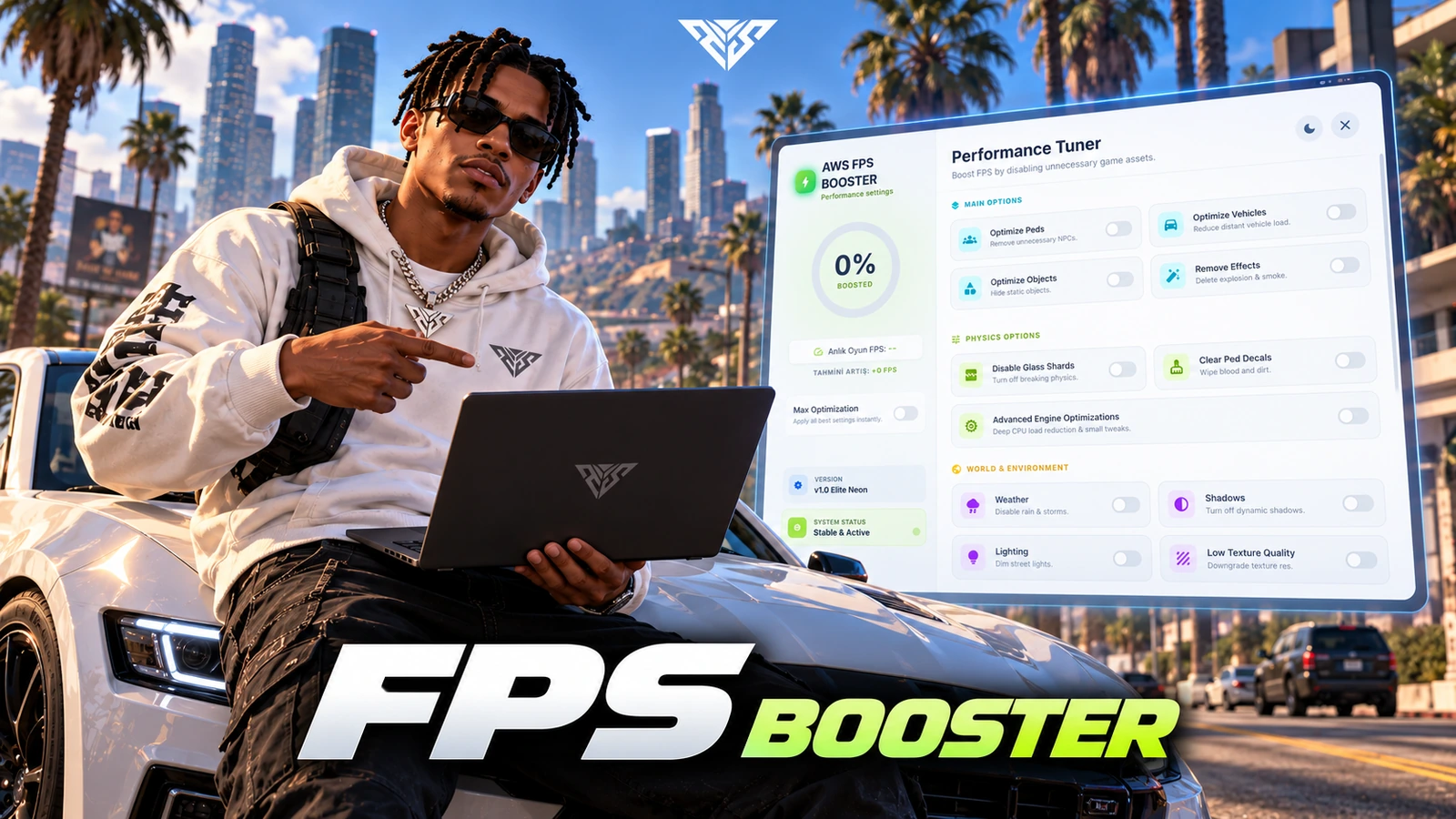
Advanced Performance Dashboard

  • Modern UI Design: A premium, glassmorphism-inspired interface that provides a sleek look while managing your system's performance.

  • Live FPS Tracker: Monitor your game's frames per second in real-time directly through the interactive menu.

  • Performance estimates: The menu displays estimated boost indicators. Actual FPS changes depend on the player hardware and other server resources.

TRY IT HERE

Explore the original interface.

Click through the controls on this page using example data. Game actions, payments and live server connections are disabled.

Original feature showcase · Video preview
02 / FEATURE

Deep Resource Management

  • Entity Density Control: Dynamically adjust or remove NPCs and distant vehicles to drastically reduce CPU and GPU overhead.

  • Object Culling: Hide static world objects and unnecessary assets to focus your PC's power on what matters most.

  • Cleanup options: The client includes focus and cache cleanup actions among its configurable settings.

Original feature showcase · Video preview
03 / FEATURE

Visual & FX Tuning

  • Particle Removal: Completely eliminate performance-heavy particle effects such as smoke, explosions, and fire particles.

  • Lighting & Shadows: Toggle dynamic shadows and street lighting to achieve massive FPS gains, especially during night-time gameplay.

  • Physics Stripping: Disable complex glass-breaking physics and debris interactives that often cause sudden frame drops.

Feature highlights
  1. 01

    Weather Override

  2. 02

    Live Texture Scaling

  3. 03

    Decal Cleaning

AWS FPS Booster
04 / FEATURE

Advanced Environment Control

  • Weather Override: Instantly clear rain and wind effects that traditionally cause significant lag on mid-range systems.

  • Low-texture option: Enable the client-side low-texture setting supplied with the resource.

  • Decal Cleaning: One-click cleanup for blood, dirt, and wetness on character models for a cleaner aesthetic and smoother performance.

Feature highlights
  1. 01

    Persistent Profiles

  2. 02

    Universal Access

  3. 03

    Multi-Language Core

AWS FPS Booster
05 / FEATURE

Seamless Server Integration

  • Persistent Profiles: All optimization settings are automatically saved via KVP and re-applied every time you join the server.

  • Universal Access: Fully configurable keybinds (Default F11) and commands, allowing players to tweak settings at any moment.

  • Multi-Language Core: Full localization support for English and Turkish, ensuring a user-friendly experience for a global player base.

Player workflow
  1. 01

    Open with F11 or /fpsMenu

  2. 02

    Review the supported options

  3. 03

    Apply individual settings

AWS FPS Booster
06 / HOW IT WORKS

From first interaction to gameplay

A client-side performance-options menu for configurable density, effects and visual settings.

  • Open the menu with F11 or /fpsMenu and test individual options before using the combined optimization action.
  • Client integration export: exports['aws-fpsbooster']:setSetting(option, state). Use only option identifiers implemented in client.lua.
Before you install
  1. 01

    FiveM; no framework/database dependency is declared

AWS FPS Booster
07 / FEATURE

Make it fit your server

Use the included source and configuration to connect this resource to your existing server. The installation guide lists the required adapters, items and startup order.

Configuration and integration details
  • Config.lua: Config.Title, Subtitle and Language control branding and locale.
  • Config.Key defaults to F11; Config.CommandString defaults to fpsMenu.
  • Config.DisableKeybind disables the opening key.
  • Config.GlobalSettings contains default behavior; Config.Locales defines the included labels.

Read installation and configuration →

THE PACKAGE

What is included

  • Readable resource source and configuration
  • Installation README and package instructions
  • Original web interface and supplied UI assets

Third-party frameworks, inventory systems and optional paid maps are separate.

GETTING STARTED

Installation essentials

aws-fpsbooster

Package-specific setup notes
  • Keep the supplied Config.lua and complete web/newui/ directory with the resource.
  • Review Config.GlobalSettings against your server gameplay before exposing toggles to players.
  • No SQL import is required. This menu changes client options; a specific FPS increase cannot be guaranteed on every computer.
Open the installation guide ↗
Expanded product interface

Updates & release notes

v2026.10.16 2026-10-16

Reviewed open-source delivery package.


THE AWS COMMUNITY

Recent Payments

Recent purchases and free claims.

✓ Completed orders
Johngotty123FREE
✓ Free claim
ZKM93FREE
✓ Free claim

JOIN OUR DISCORD

Need help with this package? Join our community for installation help, support and updates.

JOIN SERVER

VIEW DOCUMENTATION

Detailed installation guides, configuration examples, and technical requirements for this resource.

READ GUIDES